Hello Everyone
This is the first post on our new website and our first real public-facing blog! Here is where we will post monthly updates, showing off what our talented creators have worked on, discussing game concepts, lore drops, and our general creative process.
As development progresses, the community will have more chances to interact with us. Be it streaming, ama’s, closed playtesting, and even career openings. Our goal with this blog is to be as transparent as possible. We want players to see the ups and downs, the pivots, and the general hair-pulling that development can be.
This is also here to keep us accountable to you! Progress is progress, but there’s always a touch more motivation when you’ve got an audience. That’s what we hope to build with you, a working relationship. Without you, it’s simply yelling into the void. 2024 is starting with some heat, as other studios rise and fall. But we see this as an opportunity, to try something fresh and special, to creatively work together, to build something new.
So here’s to you!
FBR (Fussion Battle Rifle): circa 2.11.2024
This development log will cover the implementation of the FBR. Now, I have already created a step-by-step guide on our team’s Miro board that I will be using for the majority of this log. This is primarily to test the workflow surrounding adding new weapons.
Before we begin, there’s a bit of context that needs to be provided. The current framework is based on the Lyra project provided by Epic. If you’re not familiar with the Lyra project you can find information on it here: Lyra Unreal 5.1. At Black Moth, I’ve made some improvements to the system that the Lyra project maybe have implemented incorrectly or the functionality doesn’t exist. A few of the improvements includes: projectile support, proper client/server communication path when shooting and determining hits . More on these maybe in future posts.
Anyway, enough of the exposition! ON WITH THE FUN!
The first step tells me to create the Effects Actor this actor manages the VFX . Well fuck… I need to create the directory structure for it first. brb.
Okay. Done. Here’s the basic structure:
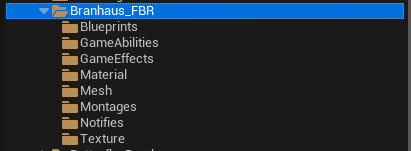
In the interest of time when writing this, I will cover each as I go through and add the required Blueprints, Abilities, etc... Onward!
The Effects Actor is the main actor for the weapon. This Actor inherits from BP_Weapon (base blueprint that governs spawning VFX, client/server visibility with regards to meshes, team colors, impacts and decals XD). The main settings that need to be setup are the Shell Eject System (along with ejected shell mesh), Muzzle Flash System and the Tracer System. As the FBR doesn’t eject bullets, that saves us some work. Let me setup the BP_FBR quick like!
Here it is (after getting side tracked making a basic VFX for the beam and a request from Mr. Neubaum to hide all UI on a button press):
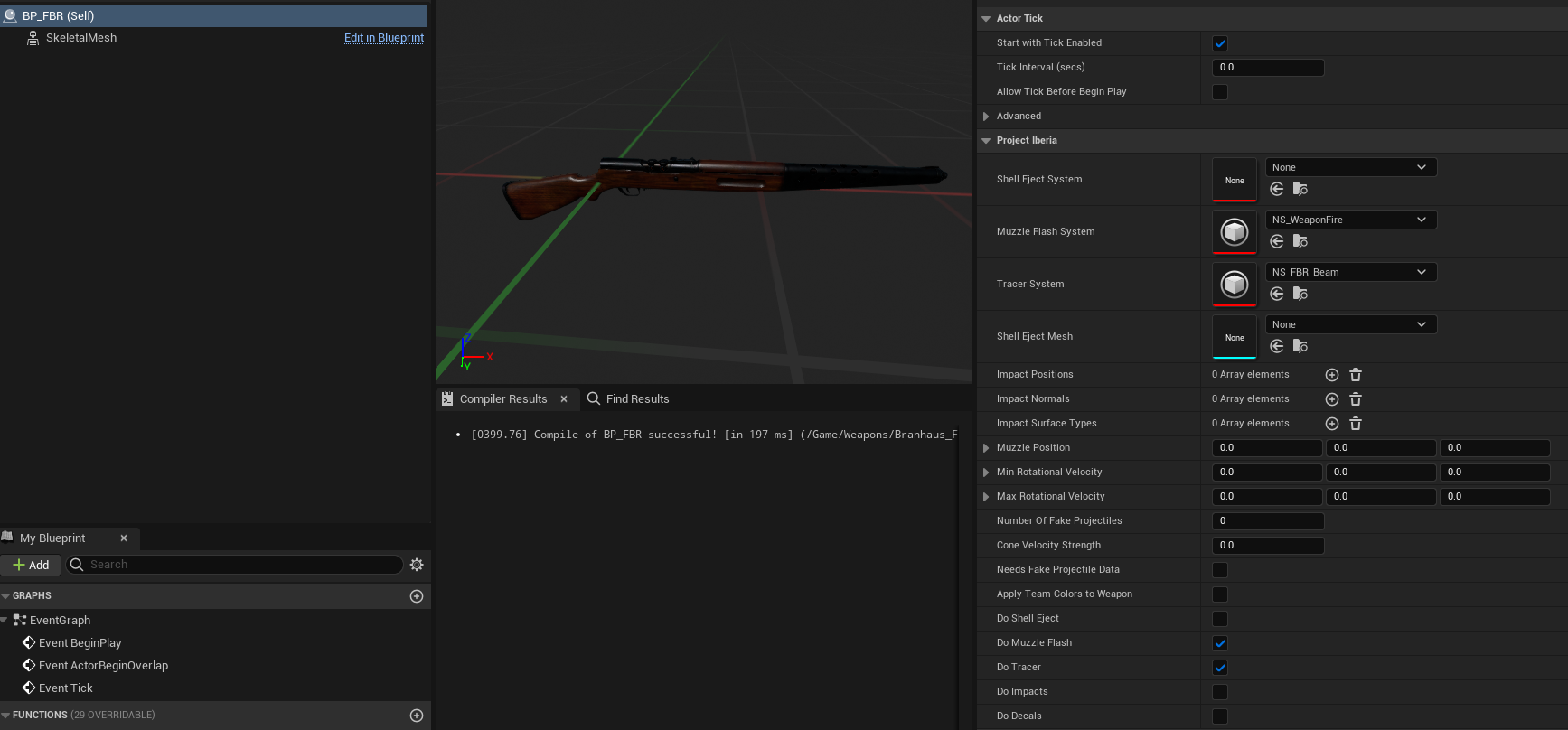
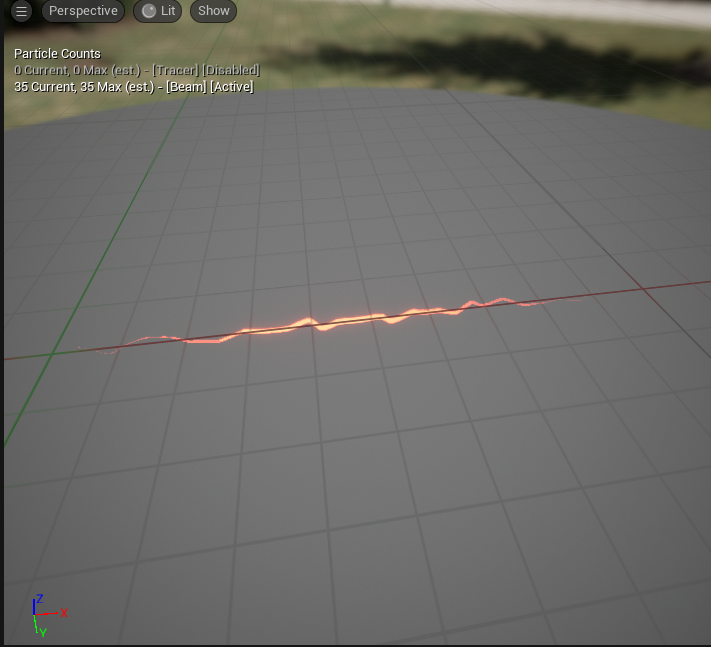
Couple of things:
Need to perform additional testing to ensure that the beam is spawning correctly.
Beam probably needs tweaking.
Next up is the Ranged Weapon Instance. This blueprint drives all parameters with regards to a particular weapon. Here’s the primary settings to be aware of:
Cosmetic Tags - Tells the system which character meshes to use (First and Third Person)
Montages - Draw and stow montages.
Recoil Data - These settings define how the weapon will recoil. This is a recent improvement that allows for procedural recoil. Save me a montage setup step XD.
Internal Weapon Parameters - Everything from spread, weapon heat, damage falloff, and player parameters when standing/crouching.
Animation Layers - Defines the animation layers for the First Person and Third Person.
Below are the settings values I used for the initial implementation of the FBR:
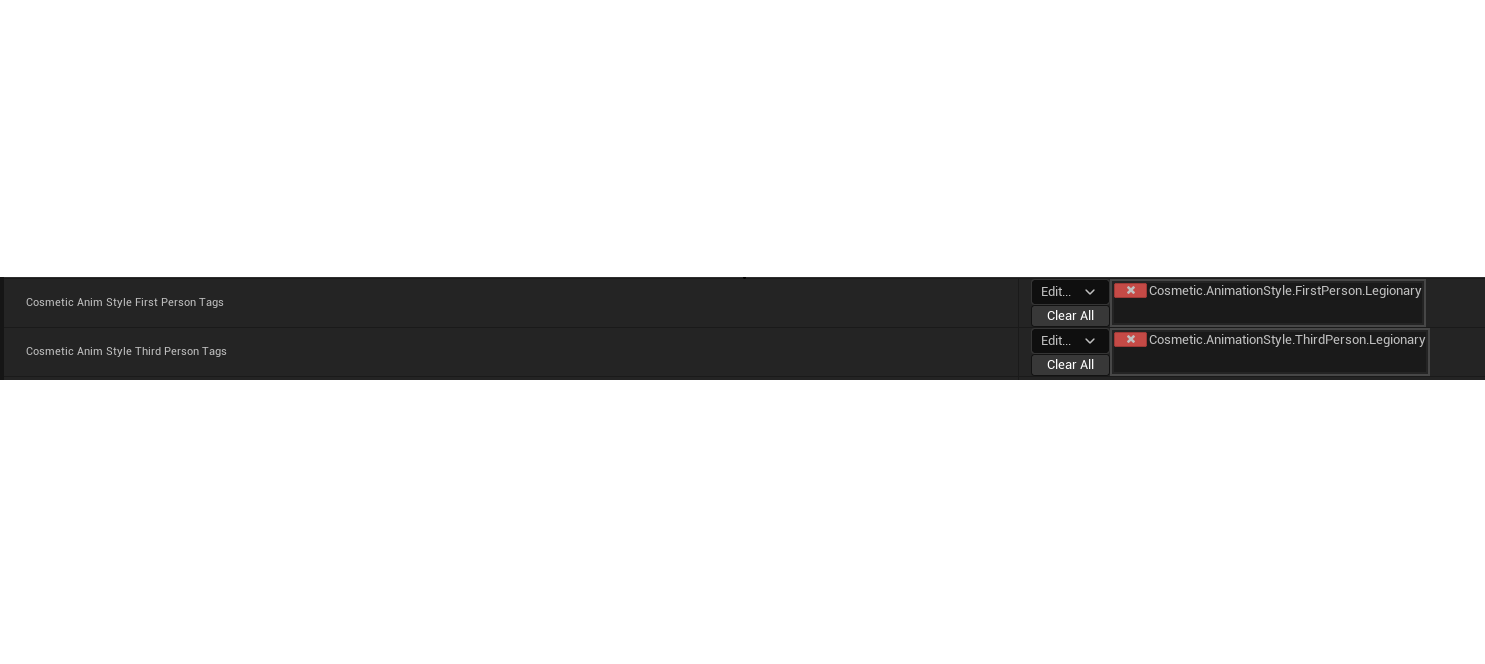
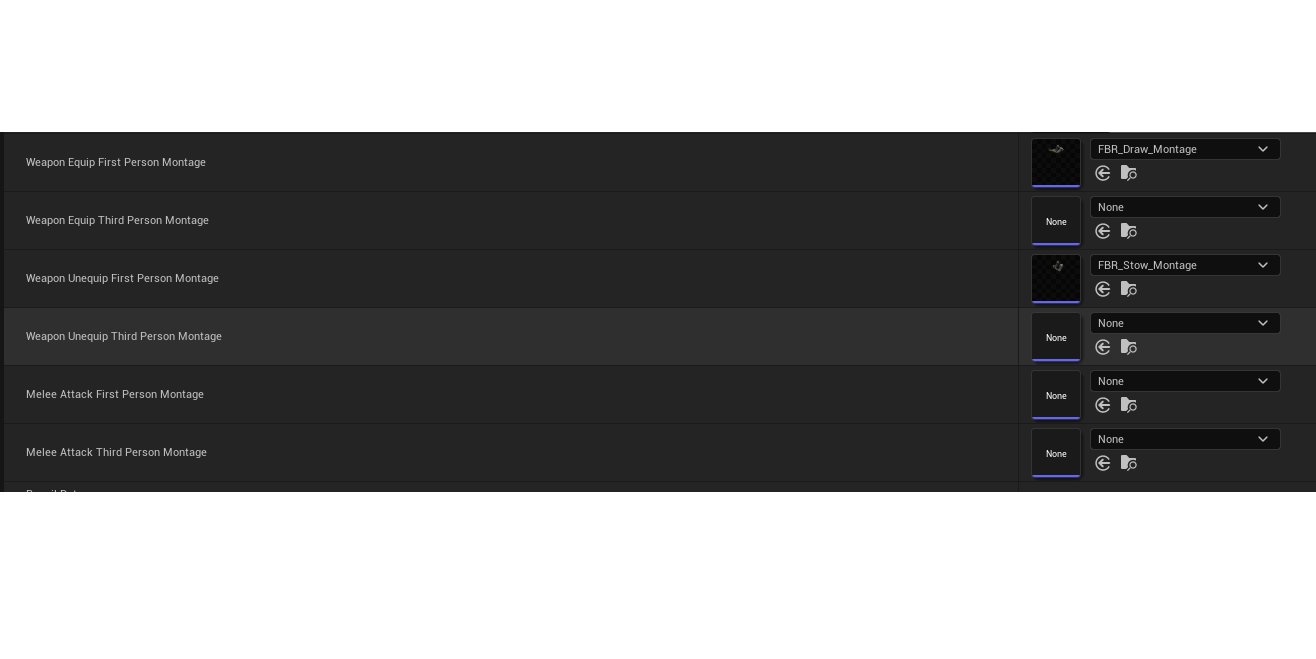
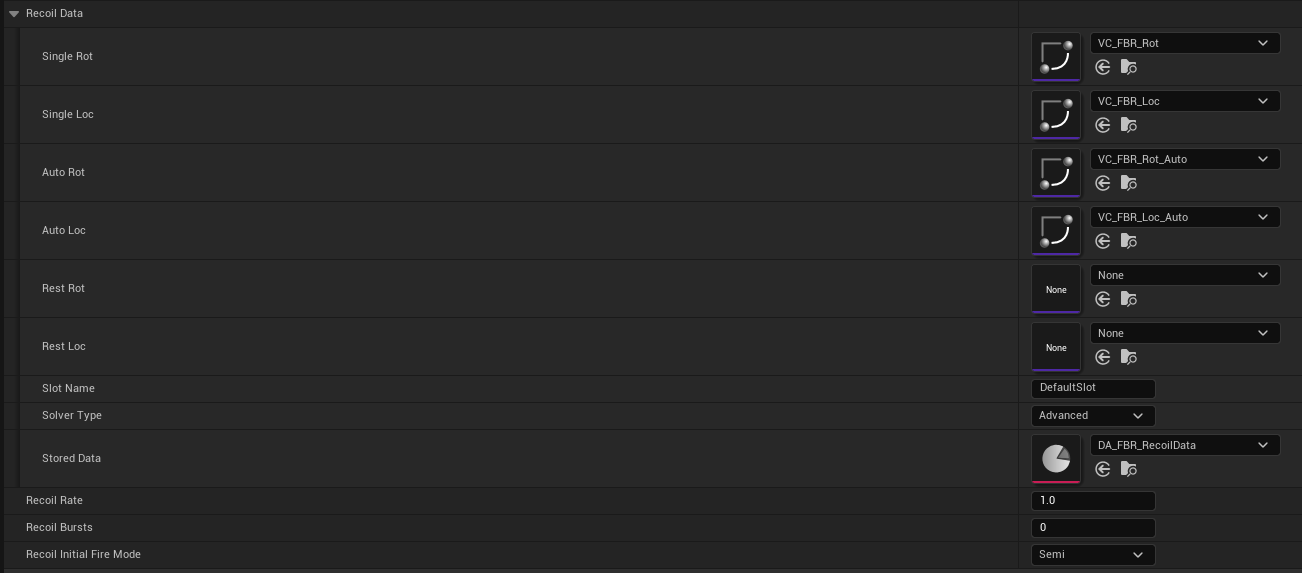
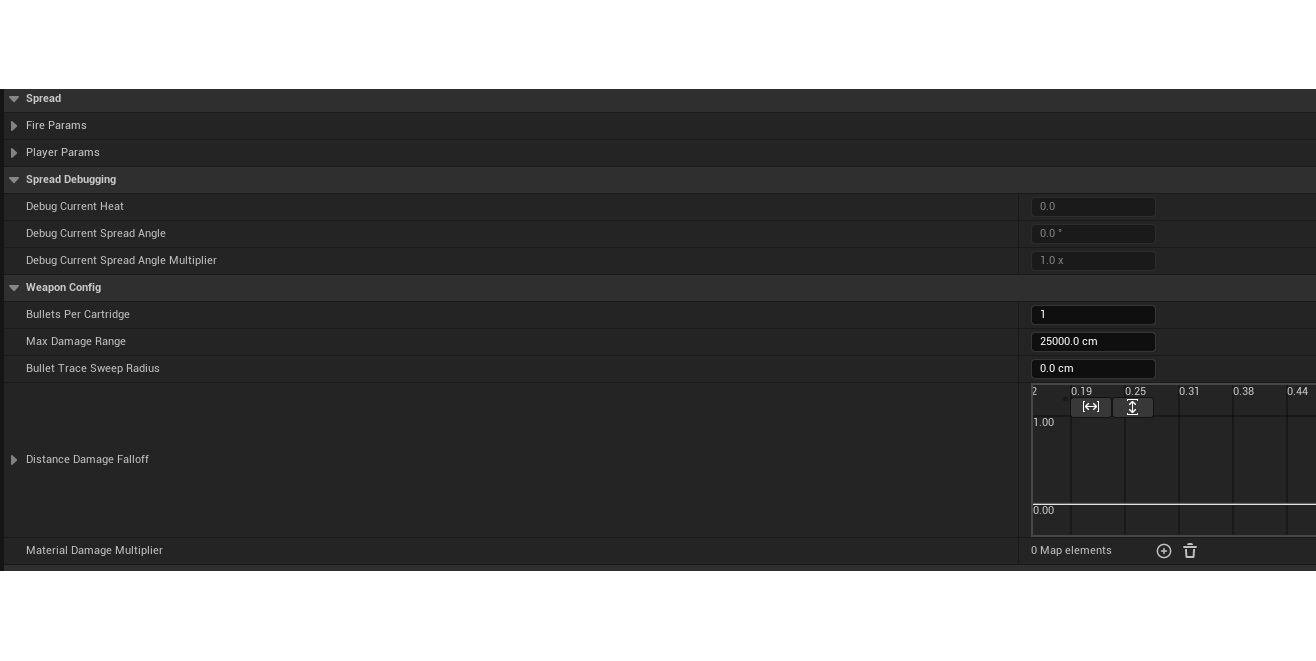
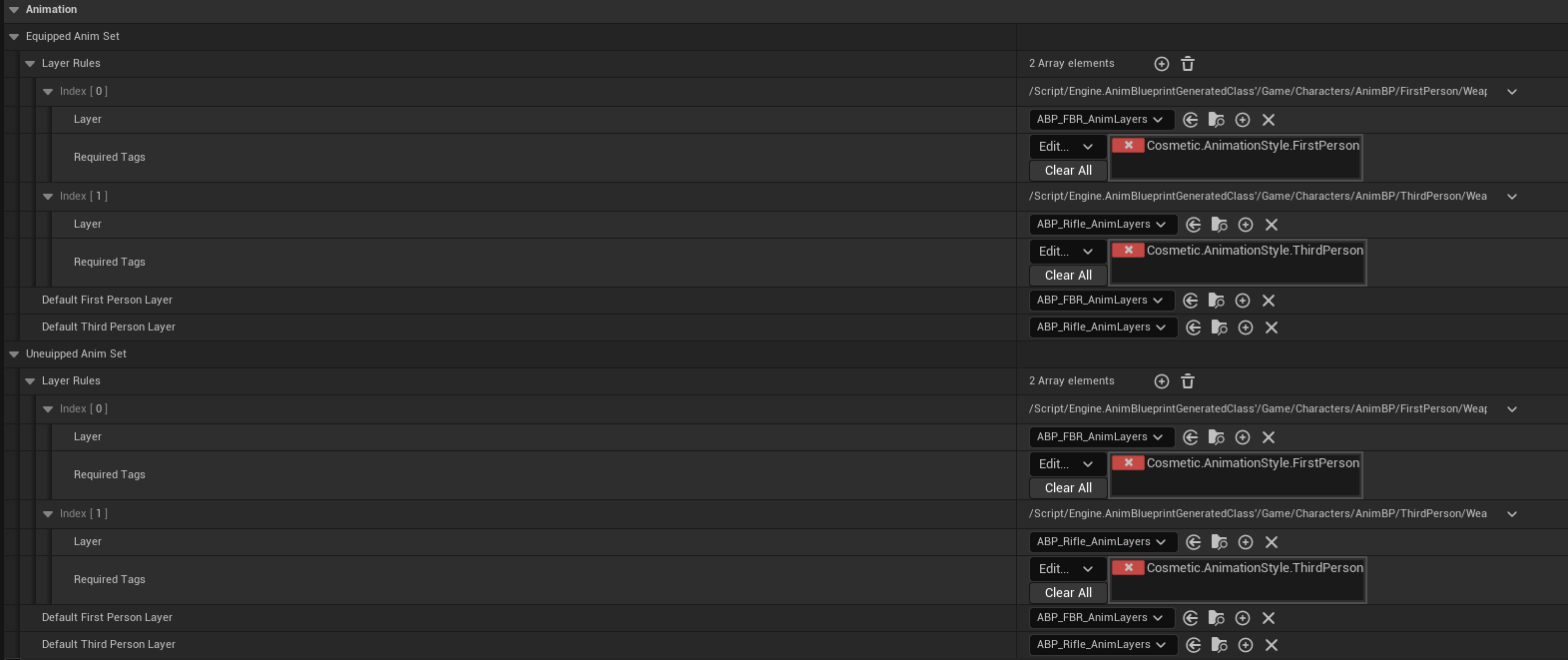
Relatively short, unless you’re doing the implementing :).
WID_FBR: This is the Equipment Definition of the FBR. At it’s heart, this Data Asset holds information like which instance of the weapon to spawn (the BP_RangedWeaponInstance_FBR we just created (wink wink), the Ability Set to give the player on spawn (drawn), as well as the Effects Actor to use (the BP_FBR from first step). There’s also old ADS crap in there too that I haven’t removed yet.
Here’s the settings!:
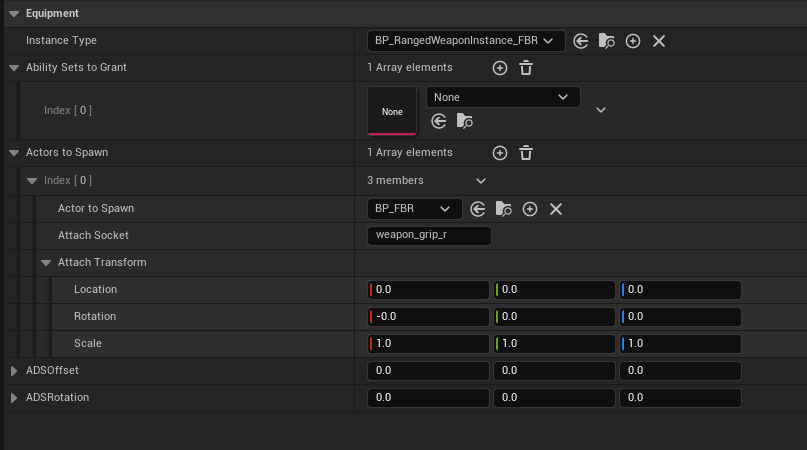
WID_FBR Settings.
At this point you may (or not) be going, “Yo, Dummy Dumberson. You’re missing the Ability Set to Grant”. Yes. Yes I am. It’s probably the best part of the process.
Ability Sets to Grant - This is the set of abilities that are granted to the player through equipping the weapon. This is generally one of the following (all of which the FBR will grant):
GA_Weapon_Fire_FBR - This is the ability responsible for sending hit information the server for validation. This is done by creating the traces on the client side and passing that to the server. After hit validation, other VFX, damage has occurred the ability can be ended.
GA_Weapon_Reload_FBR - This ability is used to trigger reload capabilities. This is a child of GA_Weapon_Reload. This allows for custom reload functionality (if needed).
GA_ADS - Not to much to say here other than. If ADS functionality is needed, then this is too :P.
GA_Weapon_Fire_FBR, GA_Weapon_Reload_FBR and GA_ADS will be housed in an AbilitySet_FBR. The AbilitySet_FBR will then be assigned back to the WID_FBR (Equipment Definition).
There’s a ton of info still left so we’ll keep rolling with GA_Weapon_Fire_FBR. Below is the breakdown of each setting(s):
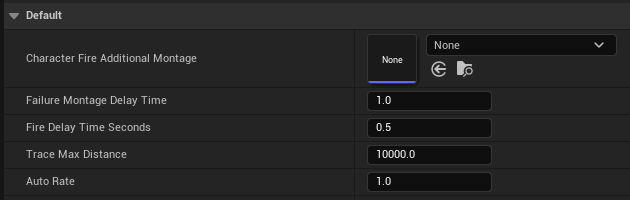
Additional Montage - Montage to be played after initial fire (like with bolt action rifles).
Failure Montage Delay Time - Time to delay shot failures.
Fire Delay Time Seconds - How long to wait between shots.
Trace Max Distance - Maximum distance to trace for object.
Auto Rate - Remnants of testing or something else. Ionno. Needs removal.
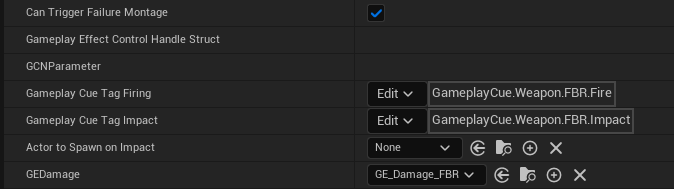
Can Trigger Failure Montage - Can we even trigger the failure montage for the fire ability?
Gameplay Effect Control Handle Struct and GCNParameter - Targeting information and Gameplay Effect information used within the Blueprint.
Gameplay Cue Tag Firing - This is the GameplayTag that links the Gameplay Cue (Firing) for the FBR and the Gameplay Ability.
Gameplay Cue Tag Impact - This is the GameplayTag that links the Gameplay Cue (Impacts) for the FBR and the Gameplay Ability.
Actor to Spawn on Impact - Vector field Actor for pushback.
GEDamge - This is all things damage with regards to the FBR (GE_Damage_FBR). Time for a slight detour to explore this GameplayEffect (Shown below is the modified parameters):
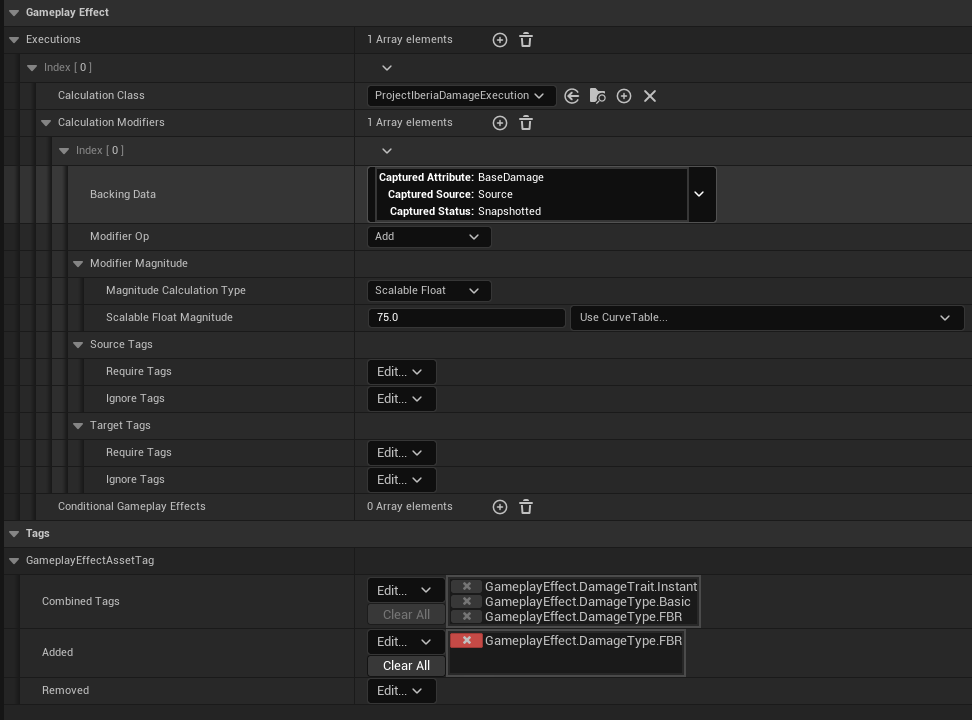
Executions | Calculation Class - This defines what happens with this effect. In this instance, ‘apply damage’.
Executions | Calculation Modifiers | Scalable Float Magnitude - The amount of damage to apply to the target.
Tags | GameplayEffectAssetTag - Tags that define the behavior of the effect. As well as to track where the damage is coming from. In this instance, the FBR.
Meow, back to the GA_Weapon_Fire_FBR:
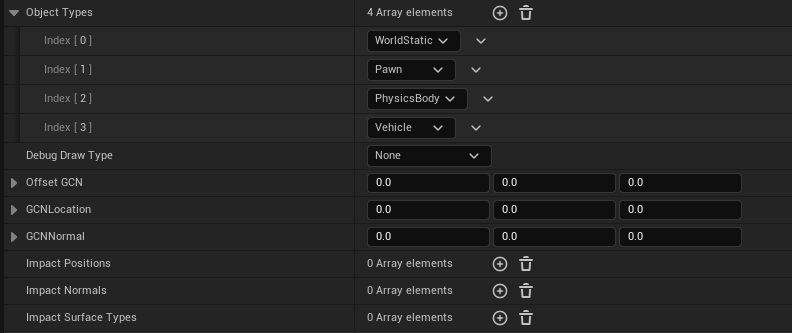
Object Types - Which types of Actors will the traces interact with.
Debug Draw Type - Hmmmmm. It’s what you think it is. Trust me.
Offset GCN - Offset to apply to a Gameplay Cue Notify (if needed).
GCN Location - Location data to pass to the Firing Gameplay Cue Notify.
GCN Normal - Normal data to pass to the Firing Gameplay Cue Notify.
Impact Positions - Hit locations as a result of the firing. End point of a trace.
Impact Normals - Hit normal as a result of the firing. Direction in which the trace impacted.
Impact Surface Types - Surface Type at the end of the trace.
2/13/2024
FFS. I had this whole joke written out then something happened the blog didn’t save.
As I said the first time when the website wasn’t listening:
Time for some more GA_Weapon_Fire_FBR! Hopefully, the rest of the settings go quick for you >3.

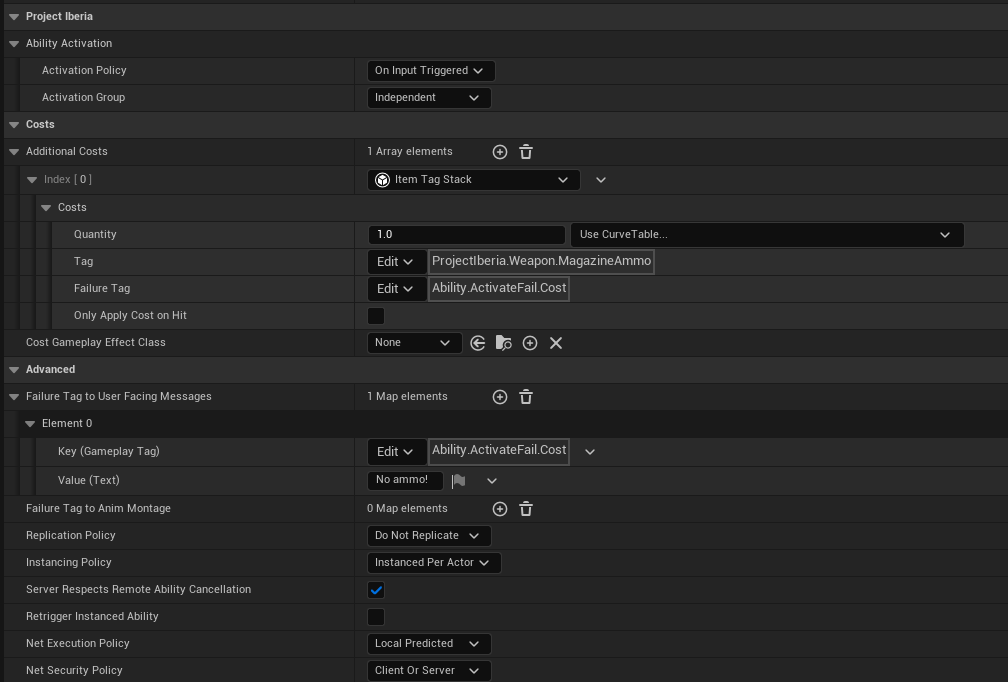
Activation Policy - On Input Triggered, While Input Active and On Spawn are the choices. Should be clear as to what is what.
Activation Group - Plays a part in ability activation (side steps technical rabbit hole). Most used case is the Independent Group.
Costs | Additional Costs - Lumping this together. This whole section defines how ammo is consumed by the weapon. Typical settings pictured above.
Advanced Section - The majority of these are Client/Sever related and the settings pictured here are working for us. Though I might have to come back and update if that isn’t the case. Most important is Replication Policy. This tells the Engine how the ability will replicate across the network.
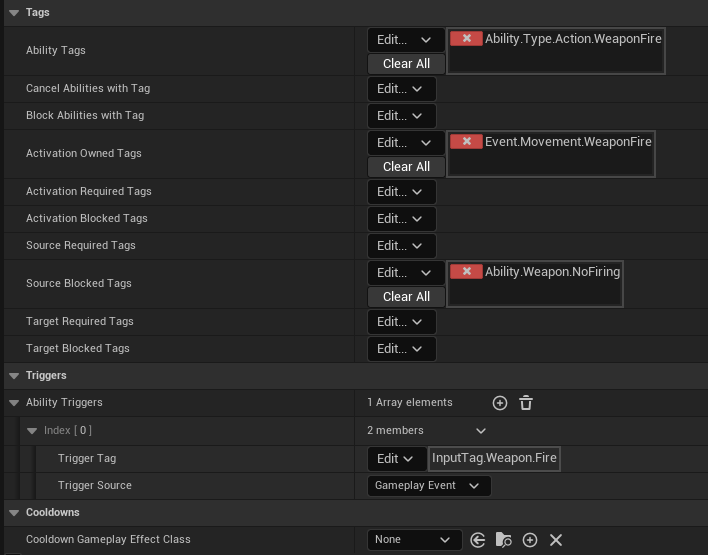
TAGS! - There seemed to be contention surrounding this among the community. I personally like it. It provides a nice robust way to track various things happening with relation to a particular game.
Anyways:
Ability Tags - Just a tag to identify the ability. It can go more granular, but for meow that works.
Activation Owned Tags - These are the tags that get applied to any given character that might be firing their weapon.
Source Blocked Tags - Pushing and popping Ability.Weapon.NoFiring to the character tag stack disables and enables (respectively) weapon firing at the player level .
Triggers | Ability Triggers - For more info on the input system we’re using, visit here. The tag pictured here is mapped to the left mouse button.
Back in the AbilitySet_FBR, set the firing ability:
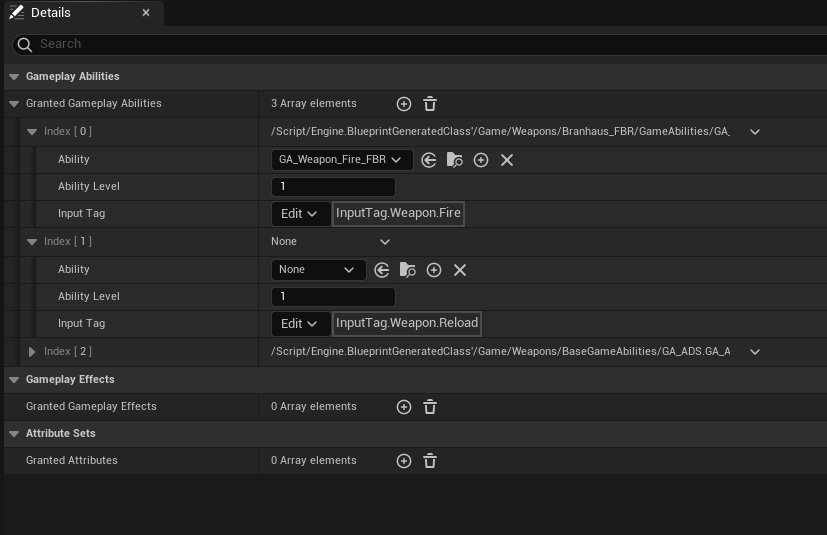
Fire ability is set.
Looking back to some of the other weapons, looks like the reload ability is next: GA_Weapon_Reload_FBR . Honestly, this isn’t much different that the Fire ability. It just serves a different purpose. To block firing during the reload process! Ability Activation through Triggers | Ability Triggers are the same. Below are the primary settings:
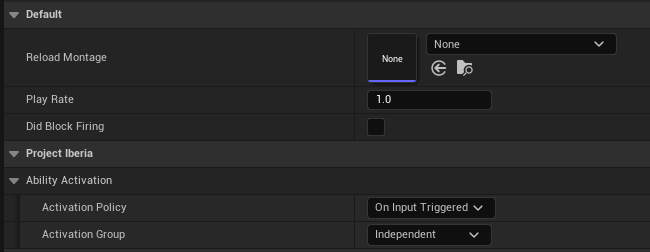
Reload Montage - The montage that we’ll need to play. I still need to create it!
Play Rate - The speed to play the montage at.
Did Block Firing - Debug stuffz.
2/15/2024
FBR_Reload_Montage - As part of the GA_Weapon_Reload_FBR , I needed to setup the montage for the reload.
Here’s the timeline:
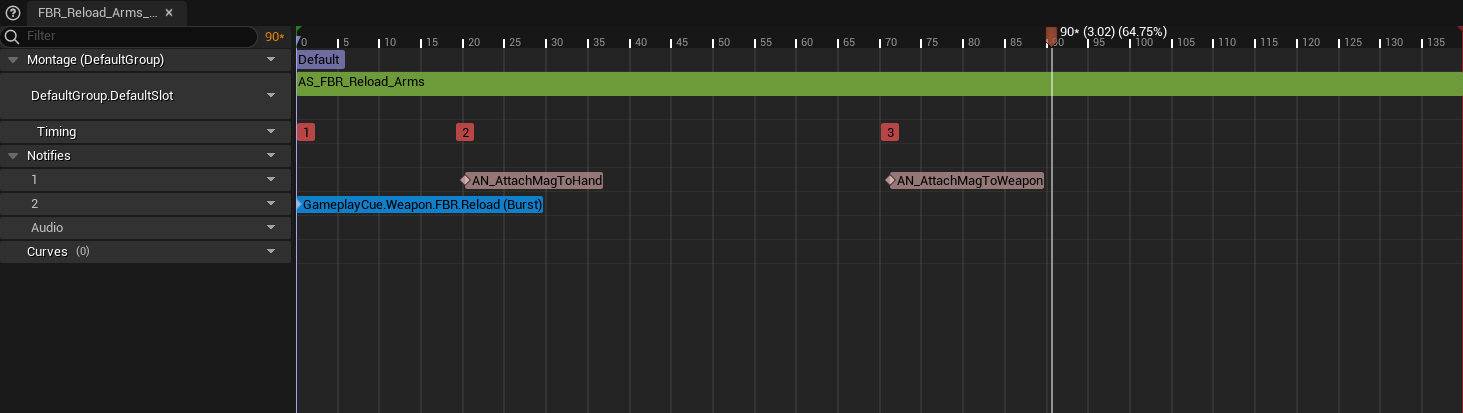
The main thing of note here is the AN_AttachMagTo_Hand and AN_AttachMagTo_Weapon. This switches the mag from the weapon to the hand and back. It’s done this way to eliminate any potential visibility/creation/destruction issues.
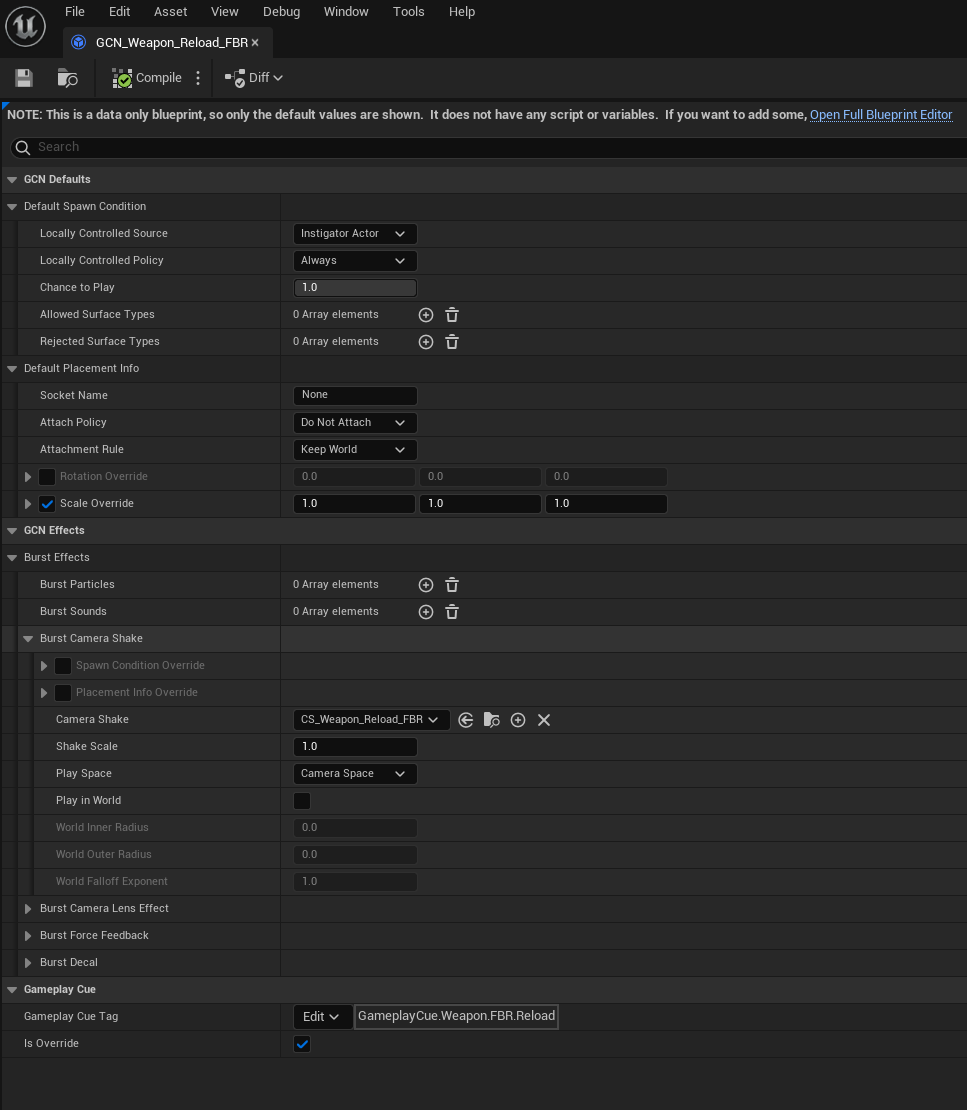
The GameplayCue.Weapon.FBR.Reload (Burst) is used to to trigger a Gameplay Cue.
Main things of note here is the Camera Shakes and the Gameplay Cue Tag. You should have an understanding of Camera Shakes. The Gameplay Cue Tag is link via the above montage.
Below is a video showing in editor, but unfortunately since preview doesn’t support Actors as temporary attachments, it can’t be validated until testing.
From here, we can meow recursively work backward and just plug things in:
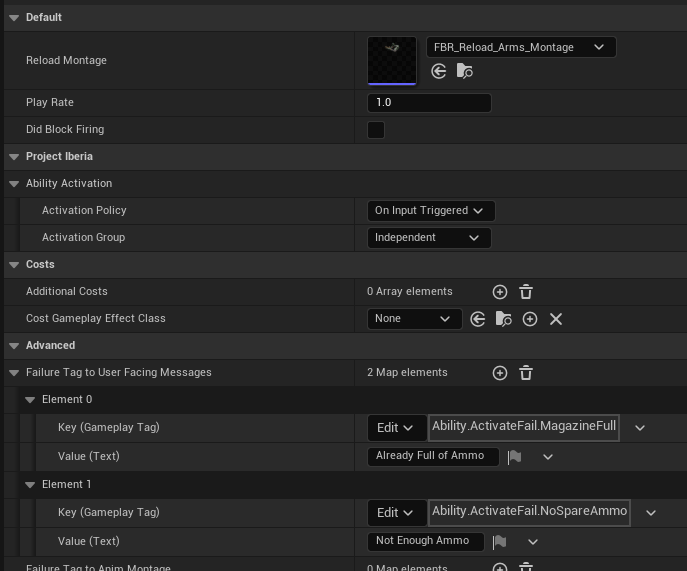
Montage plugged into GA_Weapon_Reload_FBR!
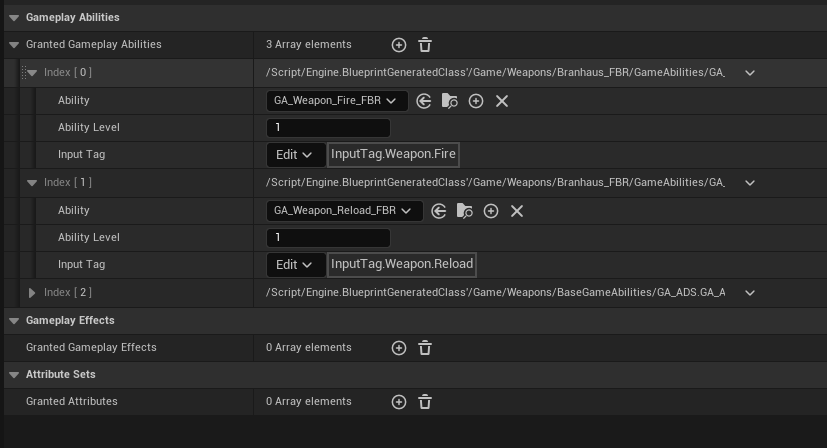
The GA_Weapon_Reload_FBR set into the AbilitySet_FBR!
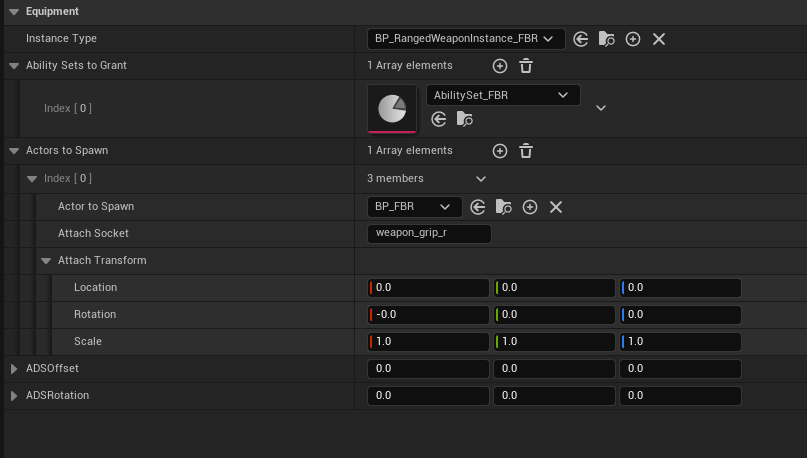
And finally the AbilitySet_FBR into the WID_FBR (Equipment Definition)
Next item on the docket is the Inventory Item Definition. This drives things like some UI visuals, how much ammo, ammo per magazine and importantly the linkage to the Equipment Definition!
2/17/2024
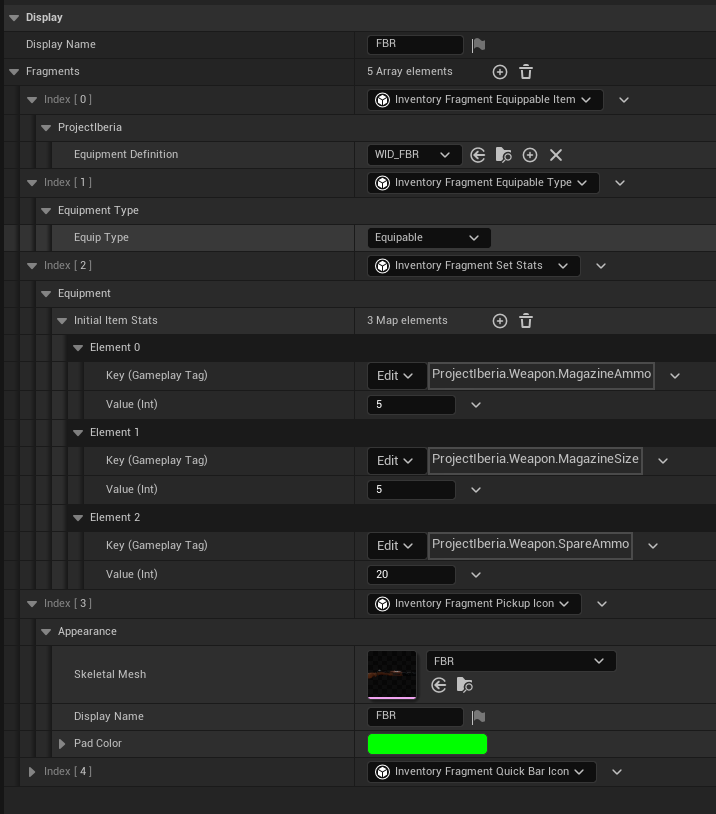
ID_FBR - Inventory Item Definition.
Above is the initial settings I used for the FBR (subject to change). Below is are the definitions for each:
Display Name - For use in UI where the name might be displayed.
Fragments | Inx 0 | ProjectIberia | Equipment Definition - This is the linkage that I had mentioned before to the WID_FBR.
Fragments | Inx 1 | Equipment Type | Equip Type - This a custom addition that allows me to differentiate between Usable Items ( grenades and things like that ) and Equipable ( weapons ).
Fragments | Inx 2 | Equipment | Initial Item Stats - These are the initial starting stats for the weapon. The ones pictured is the same as the Mauser ( for meow ). This linkage is done through Gameplay Tags.
ProjectIberia.Weapon.MagazineAmmo - This is the total starting amount in the magazine.
ProjectIberia.Weapon.MagazineSize - The total amount of ammo that a magazine can hold.
ProjectIberia.Weapon.SpareAmmo - The total amount of ammo that the player starts with. ( Might need to add MaxSpareAmmo at some point… noted… )
Fragments | Inx 3 | Appearance - This is the Skeletal mesh used by the Third Person view.
Fragments | Inx 4 | Appearance - This is the HUD Settings for the Weapon.
Brush - The brush settings for the weapon icon.
Ammo Brush - The brush settings for the ammo the weapon uses.
To kind of start wrapping up; through testing the reload, beam and the icons weren’t working. For fixing the reload, ensure that there is an AN_ReloadDone notify at the end of the reload montage. For the beam, I just decided to do some tweaking to the Niagara system for the beam and I am okay with the results (subject to change). For the icons, I was using some built in ones and I guess those don’t work that well. Mr. Neubaum will provide some custom ones. In the meantime, the Mauser icons will work as placeholders.
Testing First Person View.
Had to see in dark too!
FBR Reload.